New Mounting Points and Targets for Dashboard Apps
In 3.22, Saleor opens up brand-new ways to bring your apps directly into the Dashboard.
We are bringing a refresh to the API we haven’t touched for a while: the Dashboard’s app extensions.
Saleor Apps are at the heart of our extensibility model. They react to Saleor events and use the GraphQL API to perform business operations, letting you extend the platform in nearly any direction.
But Apps are not only about the backend. With Saleor Dashboard, you can also bring the App’s UI directly inside the same interface, keeping everything in one place.
Prior to Saleor 3.22, there were the following ways to render an app:
- In a dedicated “Apps” section, where a full-size section is available for the app.
- In a pop-up component, rendering the app in an overlay.
Back then, the Dashboard offered only a few mounting points: links in the main navigation and the "cog" menus for products, orders, and similar entities.
With 3.22, we’ve expanded the options so your apps can integrate more deeply across the Dashboard.
New Mounting Points
Firstly, we have unified mounting points. Now every “root” entity Saleor provides (that has a dedicated section in the Dashboard) will allow you to inject the app. That means you can contextually inject an app into categories, gift cards, draft orders, and more.
Apart from the unification of mounting points, we added brand-new ones. A majority of Dashboard screens contain a new “widgets” section. Apps registering to this mount will be displayed once the user opens the page. Thanks to these new mounts, app actions are now visible directly within the relevant Dashboard views.
NEW_TAB Target Type
We added two new target types. One of them is NEW_TAB. Using this target, you can open a URL in a new browser tab. This is helpful for redirecting to an external service, such as:
- Opening a product in a PIM.
- Opening an order in an ERP.
- Opening a variant in the Storefront.
WIDGET Target Type
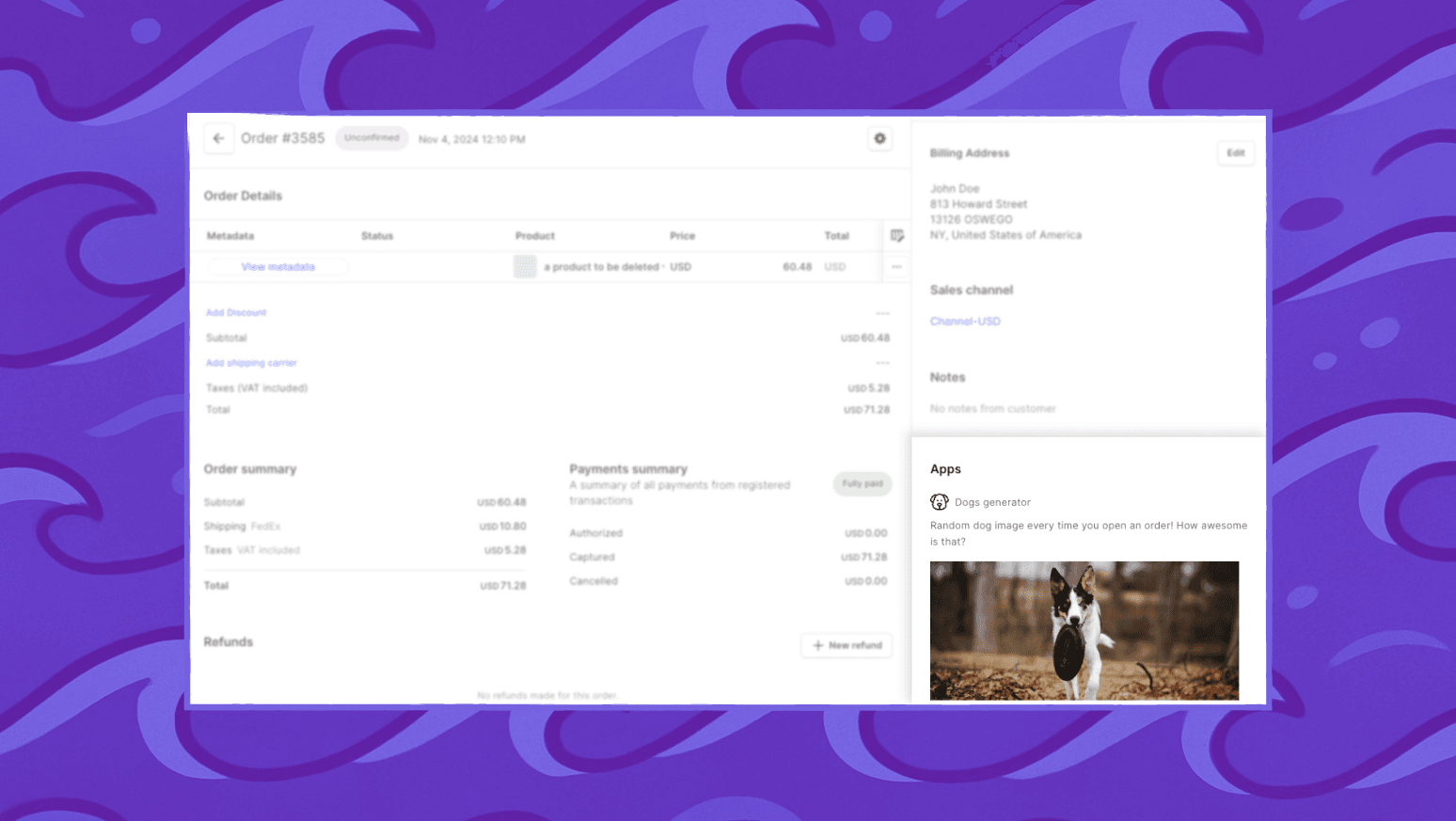
Another new target type added in 3.22 is WIDGET. The staff user no longer has to leave the page to see important data from an app. Apps that register to a WIDGET mount and use the WIDGET target will display a static frame, rendering any UI the app provides — delivering contextual data without leaving the page.
POST Requests
By default, the Dashboard opens an app with a GET request (whether in an iframe, widget, or new tab). That works well for frontend-heavy apps, like single-page React applications, where the client handles most of the logic.
Starting in 3.22, WIDGET and NEW_TAB targets can also be configured to use the POST method. In this mode, the Dashboard securely passes an access token to the app, which can then run its logic server-side and return plain HTML directly.
This makes it possible to build lightweight, fast extensions without needing a full SPA — for example, hitting a lambda function or a server endpoint that processes the request and instantly returns the output.
We’d love to hear how you use these new extension options and what you’d like to see next. Join the conversation with other developers on our Discord community:
👉 Discord