Google Merchant Center App: Scheduled Product Feeds for Every Channel
A new app builds a Google Merchant Center feed for each sales channel in the background, hosts the files for you, and replaces the Product Feed app.
The Google Merchant Center app is available for Saleor 3.23 and newer. It generates one product feed per sales channel and serves each one from a stable URL that you register in Merchant Center as a scheduled fetch.
It replaces the Product Feed app, which is now deprecated. Saleor 3.23 is the last version Product Feed supports, so on 3.24 and newer this is the app to use.
Feeds are built on a schedule
Opening a feed URL never starts generation. It returns the last feed that finished successfully.
Generation runs in the background, roughly every 12 hours. A run walks the whole catalog once and writes a products.tsv file for every configured channel. Long runs are split into chunks, each continuing where the previous one stopped, and the output is streamed to storage. That is what lets a run cover a large catalog without timing out. A failed run is retried after about 30 minutes.
The app uses no webhooks, so a product edit reaches Google on the next run. When you need a change out sooner, you can regenerate the feeds manually.
The app hosts the files. The feed URL redirects to short-lived signed storage links, and there is no bucket or credentials for you to set up.
A guard in front of the live feed
A partial API response looks exactly like a shrinking catalog, so the app compares every new file with the previous run before replacing what Google fetches:
- A run with zero rows is never published.
- A run that read less than half of the last run's products is held back, and the channel is marked as incomplete. If the drop is real, you can allow a smaller feed on that channel for one run.
- Rows missing a field Google requires (
title,description,link,image_link,price, and so on) are dropped, and the rest of the feed publishes. The channel row reports counts per field, such asmissing image_link (24), description (21), so you know what to fix in the catalog.
In every held-back or failed case, the previous feed keeps serving.
Per-channel language and URLs
Each channel has its own storefront URL, product URL template, and feed language. Merchant Center matches a data source to a country and a language, so language is set per channel, not store-wide.
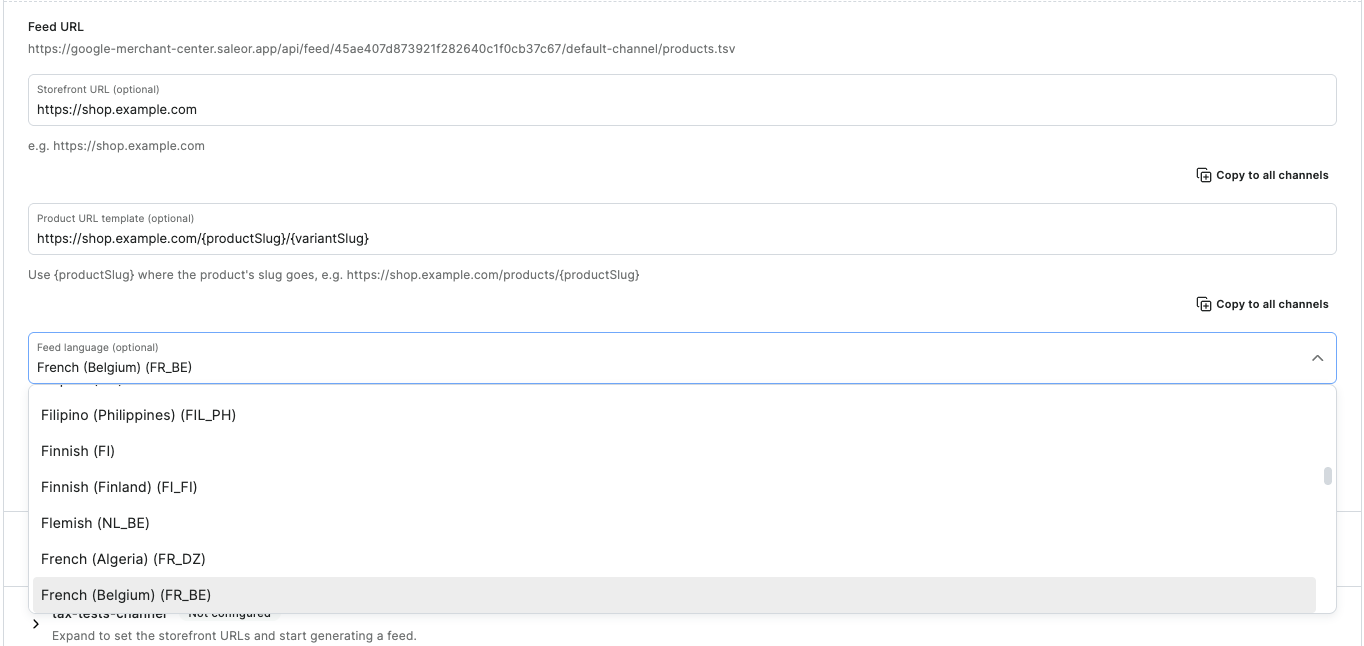
With a language set, titles, descriptions, and mapped attribute values come from Saleor translations. A missing translation falls back per field, so a product with a translated name and an untranslated description still publishes. The channel row shows how many rows went out in their original language.
Mapping
- Categories map to the Google product taxonomy and are stored in the category's public metadata under
google_category_id. - Attributes fill six columns Saleor has no native field for:
brand,gtin,color,material,pattern, andsize. A variant value wins over a product value. Unmapped columns are left out of the file, not shipped empty. - Titles come from a Handlebars template,
{{ product.name }} - {{ variant.name }}by default.
What changed from Product Feed
| Product Feed | Google Merchant Center | |
|---|---|---|
| Saleor versions | 3.22 – 3.23 | 3.23 and newer |
| Feed format | XML | TSV |
| Storage | Your own S3 bucket and IAM credentials | Hosted by the app |
| Generation | Rebuilt inside the fetch request when the cached file aged | Background runs every ~12 hours, plus on demand |
| Bad or partial run | Served as generated | Held back by the publish guard |
| Translations | Not supported | Feed language per channel |
| Dropped rows | Not reported | Counts per missing field, per channel |
The generation row is the one that matters at scale. Product Feed built the file while Google's fetch waited on the response, so a large catalog raced the request timeout. The new app finishes the work first and only ever serves a finished file.
Both apps map the same six attribute columns, and both store the Google category in the same google_category_id metadata key.
Moving over
- Install the Google Merchant Center app and fill in the storefront URL and product URL template for each channel.
- Map attributes again. Category mapping carries over because the metadata key is shared.
- Wait for the first feed of each channel to publish. Until then its feed URL returns 404.
- Register the new per-channel URLs in Merchant Center as scheduled fetches, then remove the old XML data sources.
- Uninstall Product Feed and delete the S3 bucket and IAM user you created for it.
Reinstalling the app changes the feed URLs, so keep one installation per environment.