Pulse: Introducing Commerce Context protocol
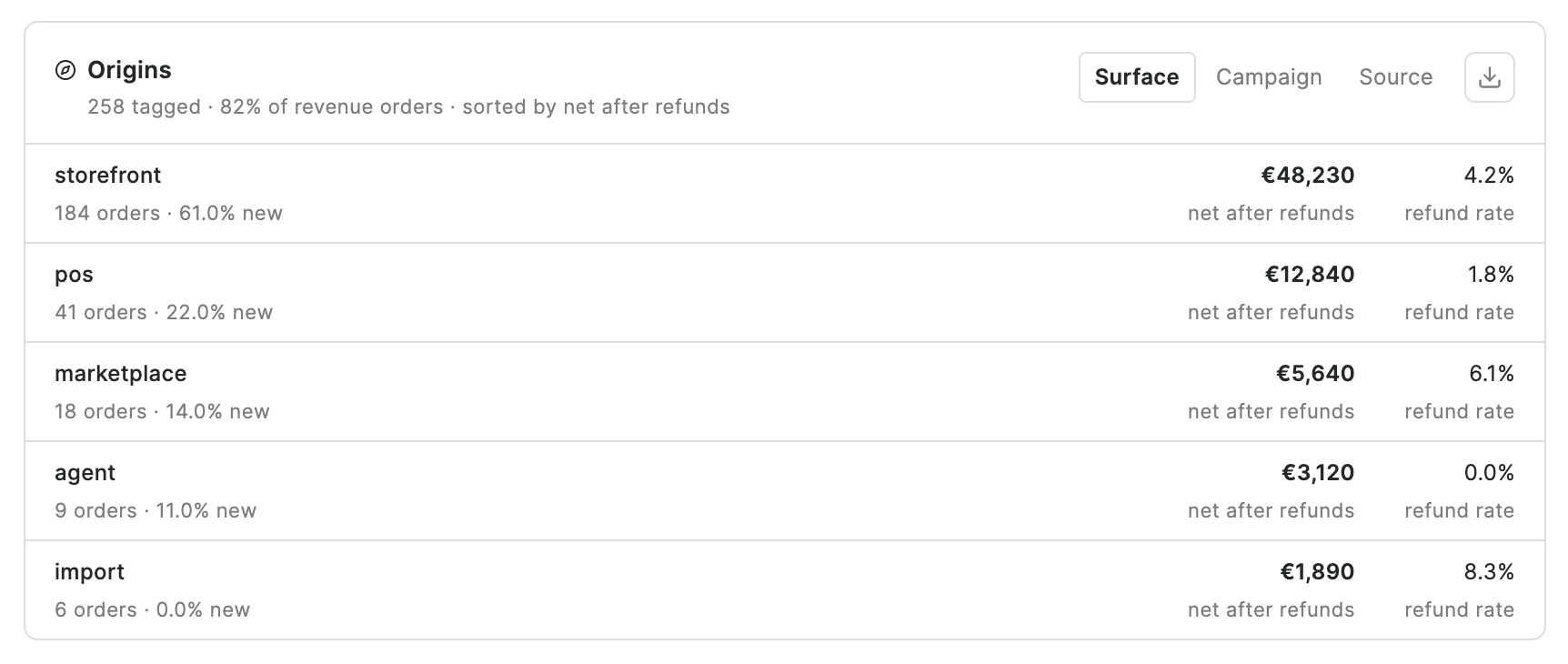
A small metadata note on the Saleor order. Pulse ranks the origins that still have net after refunds — and any checkout can write the note, including a mobile app.
Session tools count visits. Saleor counts money. Neither can say, on the order, where that sale came from.
That is the gap Pulse and Commerce Context are built to close. Write the note before complete. The join lives on the commerce record.
Every order can carry a small note about where it came from.
Pulse ranks those origins by the money that remains after refunds.
Saleor shops are multi-surface. POS, draft, import, agent, and storefront are not campaign parameters. One note language puts them on the same table as campaign and source.
Origins in Pulse is that table: tagged revenue orders, first landing stored on the note, ranked by net after refunds in the Financial window. A holdout still answers incrementality. This answers the books.
The join on the order
Evidence on the order. Origins in Pulse
Saleor stays the commerce record. Writers attach facts. Pulse is a reader.
Commerce Context is an open format for that note. Storefronts and apps write sectioned metadata under commerce.context.*. Pulse composes those keys when it ingests the order, then shows Origins on Financial: surface, campaign, or source.
The write shape and compose rules live in the Commerce Context Spec. Pulse ships the reader. Copy the keys. Let the reader compose.
Click IDs for Meta or Google stay on your ads path. Use Pulse for revenue on the books. Use the analytics tool for funnel shape.
What you write
Sectioned keys, one owner each
Write each section as its own metadata key — origin, marketing,
session — not one combined JSON blob. Saleor replaces a whole key on write. Do not
read-merge-write someone else's section.
A document is useful to Pulse as soon as origin.surface parses. Marketing alone is only a partial note.
surface is how the order was created. Pulse v1 recognizes storefront, pos, draft, import, marketplace, api, agent, and support — that list will grow. Pick the closest match. Put the writer in system (paper, your app id, a register build). Do not invent a surface for a device or a brand. Channel stays on the Saleor order.
origin
Who created the checkout. Required. Never gated on cookie consent — it describes the order, not the person.
marketing
First-touch UTM fields plus a redacted landingPath. Write once, fill-missing. Pulse ranks
campaign and source on this first landing. Last-touch is a different policy — own the whole key if you
need it.
session
A per-visit sessionId when storage is allowed. Do not write anonymousId in v1.
ext.<vendor>
Your own JSON bag. Paper writes ext.paper (locale, baseline). Pulse folds it into
properties.
actors / experiment
Affiliate, sales, agent, support, or a flag tool. Write these only if you are that system.
consent
Lives on origin: granted, denied, not_required,
unknown. Without it, a declined visit looks like direct traffic.
Paper as the reference
Two writes. Same GraphQL your app already has.
Paper is the reference storefront. Copy the keys, not the React tree.
Saleor 3.21+ accepts metadata on checkoutCreate (Pulse and Paper target 3.23+). Paper puts origin and ext.paper in that mutation — zero extra round trips, present even if the shopper abandons before complete.
Marketing and session need storage. Paper writes them with updateMetadata before checkoutComplete, and only when origin.consent is granted or not_required. Saleor copies that metadata onto the order at complete. Pulse reads the order.
Paper's default consent mode is required, and core Paper ships no banner. Create-time consent is then unknown, tier two is skipped, and Pulse still marks the order valid from origin alone. That is a complete origin note. You get surface on Origins. Campaign and source stay empty until you actually allow first-touch cookies.
The Paper builders live in saleor/storefront under src/lib/commerce-context/. They are pure functions: you can read them from a native app without taking Next.js with you.
Other checkouts
Same keys on iOS, Android, and a register
Change surface and system.
Keep the key names.
A native app that creates checkouts is still a storefront. A till is not.
| Writer | surface |
system (example) |
Marketing |
|---|---|---|---|
| Paper / web storefront | storefront |
paper |
First-touch, consent-gated |
| iOS or Android shopping app | storefront |
your app id | Same rules if you keep a landing snapshot |
| POS / register | pos |
register build | Usually none |
| Dashboard draft | draft |
dashboard | Usually none |
CSV / orderBulkCreate |
import |
importer name | Usually none |
| Support or agent placing order | support / agent |
that tool | Optional; actors if you own that identity |
Set consent to not_required when there is no shopper cookie (a till, an import). Write denied when the shopper said no — and then omit marketing and session. That is how Pulse can keep “direct,” “declined,” and “not captured” apart later.
In Pulse
Origins sits on Financial, on the same period, currency, and channel as the rest of that view. The subtitle is coverage for that window: tagged revenue orders over all revenue orders. Unconfirmed orders count. Cancelled ones do not. Untagged surfaces do not rank as worse — they are absent until they write the note.